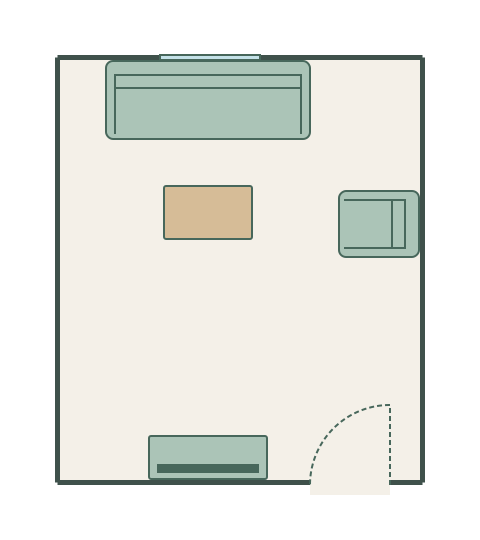
Sofa and TV layout
3.6 × 4.2 m · example room
A compact seating group with a route around its open side.
The living room planner is a free online tool for trying every furniture arrangement before you move a thing. Draw your living room to scale, drag sofas and tables, check traffic flow, and find the layout that works — all free, no account needed.
Open a furnished example and adjust each wall and item to your room. These are editable plans at the sizes shown.
3.6 × 4.2 m · example room
A compact seating group with a route around its open side.
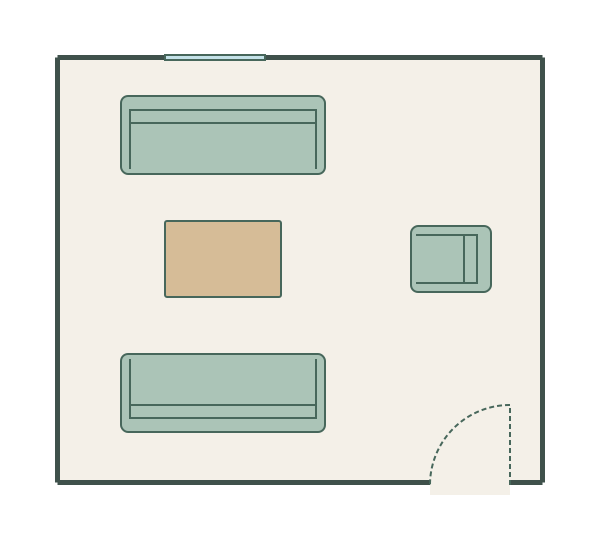
4.8 × 4.2 m · example room
Facing sofas with a shared table and a separate entrance route.
Choose a square, rectangle, L-shaped or T-shaped room and enter its inside dimensions. Or start on a blank grid.
Measure your living room walls and draw them to scale. Mark door, window, and radiator positions.
Drag sofas, armchairs, coffee tables, and TV units from the library. Try different arrangements. Check traffic paths between doorways.
Export the plan as a PNG and share with an interior designer, partner, or removal company.
Draw your living room walls to the centimetre so you know exactly what will fit.
All common living room furniture in the library, ready to drag and drop.
Check walkways between doorways are clear and furniture doesn't block movement.
Mark door swings and window positions so furniture doesn't obstruct either.
Add labels like 'reading corner' or 'TV area' to communicate your intent clearly.
Download your living room plan as a PNG and share with designers or family.
Most living rooms work best with seating arranged in a U or L shape facing a focal point — fireplace, TV, or window. In Free Room Planner, try different sofa and armchair positions to find the arrangement that encourages face-to-face conversation without shouting across the room.
For a comfortable viewing experience, sit at a distance of 1.5 to 2.5 times the diagonal screen size from the TV. A 55-inch TV works best at 2.1 to 3.5 metres. Draw your room in Free Room Planner and measure the distance from the sofa to the TV wall before buying.
If your living room has two or more doors, people will walk between them. Keep a clear path of at least 90 cm wide between doorways, and avoid placing coffee tables or rugs in the traffic lane. Mark doors in Free Room Planner to visualise these routes.
A symmetrical layout (matching armchairs flanking a fireplace, for example) creates visual calm, but perfect symmetry isn't always practical. Use Free Room Planner to test both symmetrical and asymmetrical arrangements and see which fits your room's shape better.
If your living room shares space with a dining area, use furniture placement to define zones. A sofa facing away from the dining table creates a natural boundary. Draw both zones in Free Room Planner to ensure each has enough space. See our open-plan living guide for more on combining kitchen, dining, and lounge areas.
Planning new finishes too? Use the flooring calculator to estimate floor area, packs and waste, then calculate paint for every wall with the paint calculator. See all calculators.
Planning a different room? Use the planner built for it — same canvas, same free export.
Plan your kitchen layout with units, appliances, and islands.
Position sanitaryware and fittings before the plumber arrives.
Find the best bed position and storage configuration.
Draw whole-floor plans with multiple rooms, doors, and windows.
A sofa that looked right in the showroom can kill a room's flow once it's home. A TV unit positioned opposite the wrong wall means glare all afternoon. These are problems that show up immediately when you draw the room to scale — and they're invisible until then.
The living room planner lets you place sofas, armchairs, coffee tables, TV units, bookcases, and rugs in your actual room dimensions. Try different orientations, see whether a corner sofa works, check that the traffic flow between the kitchen and the door still makes sense. Then export the plan and share it with whoever's delivering the furniture.