Measure the finished inside faces of the room, record each wall separately, then locate every opening from a named corner. Keep your original readings: a tidy rectangle on paper is not useful if the real room is tapered.
This guide covers the measuring stage. It includes two dimensioned examples and a printable room measurement worksheet. Once your measurements are checked, follow our worked guide to drawing a floor plan.
Why do accurate room measurements matter?
A sofa can fit between two walls but still block a door. A wardrobe can fit at floor level but catch a sloping ceiling. Your notes need to capture the usable space and the things that restrict it, as well as the room's overall width and length.
The examples below are original measuring diagrams. They are deliberately simple so you can check the arithmetic. They are not measurements of your property, and a planning sketch does not replace a fitter's final site measurement.
What tools and units should you use?
- A tape measure: long enough for the wall you are checking. Keep it straight and level; a helper is useful across a long span.
- A pencil and labelled sketch: write each reading down immediately. A phone photograph of the wall helps you remember which corner you used.
- A laser measure, if you have one: check whether it measures from its front or rear face. Use a suitable solid target and follow its instructions; cross-check awkward openings with a tape.
Choose millimetres, centimetres or feet and inches, and keep that notation throughout your notes. Metric is convenient for UK furniture dimensions. Imperial works too; do not write a bare “12.6” when you mean 12 feet 6 inches.
| Original measurement | Equivalent | Useful reminder |
|---|---|---|
| 4,200 mm | 420 cm = 4.20 m | Enter the number in the unit shown by the planner. |
| 12 ft 6 in | 150 in = 3,810 mm | 12.6 feet is a different measurement: 12 ft 7.2 in. |
| 36 in | 914.4 mm | One inch is exactly 25.4 mm; keep the original reading alongside conversions. |
How to measure a rectangular room
1. Label the corners before measuring
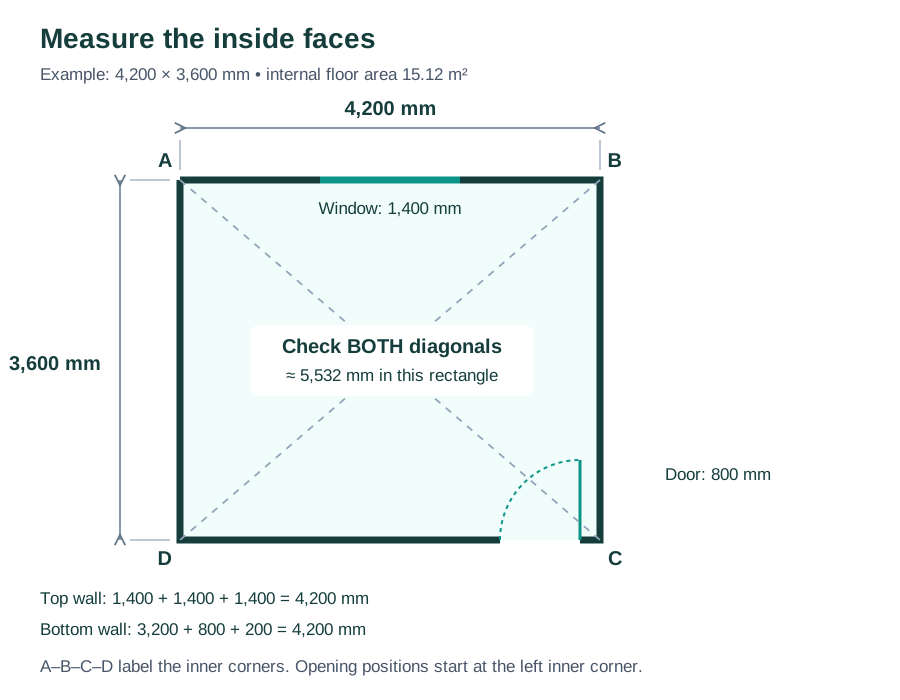
Sketch the room looking down from above. Name the inner corners A, B, C and D clockwise, and mark the entrance. The sketch does not need to be to scale yet. These labels make “window starts 1,400 mm from A” much clearer than “window on the left”.
2. Measure all four sides
Measure between the finished wall faces at a consistent height just above the skirting. Record A–B, B–C, C–D and D–A separately. Repeat the measurements; recheck a disagreement instead of choosing the number you prefer.
Also measure the space between the skirting faces where furniture will stand. Skirting projects into the room, so the clear floor-level gap can be smaller than the wall-to-wall distance. Record that projection rather than assuming a standard thickness. For fitted furniture, measure at the bottom, middle and top of the intended position and keep every reading.
3. Check the diagonals
Measure A–C and B–D using the same reference points and height. In the example, a true 4,200 × 3,600 mm rectangle has diagonals of approximately 5,532 mm: √(4,200² + 3,600²).
Different diagonals can reveal a skewed room or a measuring error. Matching diagonals alone do not prove every corner is square. Read them alongside all four wall lengths; if the readings do not agree with a rectangle, keep the actual shape and measurements.
4. Record ceiling height and low points
Measure floor to ceiling in more than one place. Record beams, slopes and the lowest point above any tall furniture. A 2D footprint will not tell you whether a wardrobe fits under a ceiling slope.
How to measure doors, windows and alcoves
For each feature, write down its wall, the reference corner, the distance to its near edge and its width. Measure the remaining distance to the next corner as a cross-check.
| Wall and feature | Corner → near edge | Width | Far edge → corner | Check |
|---|---|---|---|---|
| A–B: window | 1,400 mm from A | 1,400 mm | 1,400 mm to B | 4,200 mm total |
| D–C: door opening | 3,200 mm from D | 800 mm | 200 mm to C | 4,200 mm total |
If the pieces do not add up to the independently measured wall length, remeasure. Do not distribute the error across the gaps to make the numbers fit.
Doors
Record the opening width, frame or trim footprint, hinge side and swing direction. Opening width and door-leaf width are not necessarily the same. If you need to move furniture through the doorway, separately check the clear opening with the door open, including protruding handles. Draw the swing arc on your sketch.
Windows
Note opening width, position along the wall, sill height from the finished floor and how far the sill projects. Include the opening direction and handles if they could meet a tall item. Curtain poles and curtains may need space beyond the window itself.
Alcoves and chimney breasts
Record every return: the width across the feature and its depth into or out of the room. Measure an alcove at several heights, especially before choosing shelves or cupboards. A tapered alcove cannot be represented reliably by one average width.
Radiators, pipes and sockets
Measure a radiator's full width including valves, its projection and its height. Mark fixed pipes, sockets, switches and service access points on the sketch. These measurements locate obstacles; they do not establish the installation or maintenance clearances required by a particular product.
How to measure an L-shaped or uneven room
Walk around the perimeter and record a new segment every time the wall changes direction. For an L-shape, label all six corners. Measure the overall spans as an independent check on the shorter segments.
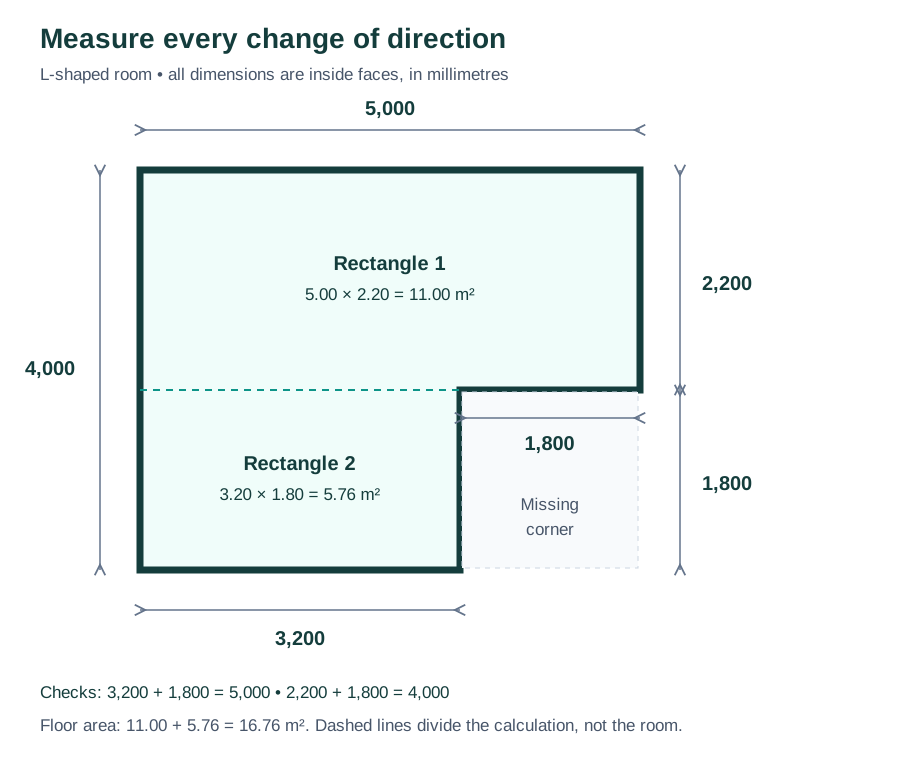
- Width check: 3,200 + 1,800 = 5,000 mm.
- Depth check: 2,200 + 1,800 = 4,000 mm.
- Area: (5.00 × 2.20) + (3.20 × 1.80) = 16.76 m². Convert lengths to metres before multiplying.
For a bay window, measure each angled face and take additional distances from fixed reference corners to locate the changes of direction. For a room that is out of square, keep both diagonals and all wall lengths. Do not average a 3.60 m wall and a genuinely different 3.58 m wall into two 3.59 m walls. First rule out a measuring error; if the difference is real, record it.
Room measurement worksheet and final checks
Open the printable worksheet Download a copy
The worksheet includes a sketch area, repeated wall readings, diagonals, ceiling heights and an openings table. Open it and choose Print / Save as PDF to take a paper copy around the room.
- Every corner and feature has a name that matches the sketch.
- All numbers have units, and wall readings use a consistent reference height.
- Door/window segments add up to the independently measured wall length.
- Floor-level restrictions, ceiling slopes and furniture delivery openings are recorded.
- Any uncertain reading is marked for a recheck, rather than quietly rounded away.
What else matters in different rooms?
Kitchens: locate pipes, sockets, appliance connections, boxed-in services and anything that prevents a cabinet sitting against the wall. Use the kitchen planner to test an arrangement after measuring; your fitter should confirm installation dimensions.
Bathrooms: mark the soil pipe, drainage positions, existing fixtures and door swing before choosing replacements. The bathroom planner helps compare footprints, while the actual products determine their opening and service space.
Living rooms and bedrooms: measure the full furniture footprint, including arms, handles and bed frames. Check the route into the room as well as the final position.
The mistakes worth catching before you draw
Most avoidable errors come from mixing units, forgetting an opening's position, measuring to skirting on one wall and plaster on another, or forcing an uneven room to look square. Keep the raw notes and photos. A neat plan should explain the measurements, not conceal a discrepancy.
Common questions
Should I include wall thickness?
For furniture planning, start with finished internal room dimensions. Wall thickness is a separate measurement. Do not add it to your inside reading; the planner's inside and full-wall measurements describe different reference points.
Can I rely on a phone measuring app?
Use it for a rough starting point if useful, then check the dimensions that decide whether an item fits with a tape or suitable measuring instrument. Keep any uncertainty visible in your notes.
How accurate do my notes need to be?
Record what you measured without rounding away a small gap. A loose furniture arrangement and a made-to-measure cabinet require different levels of certainty. Confirm tight fits and fitted work on site before ordering.
Turn the checked measurements into a floor plan
Our floor-plan walkthrough uses the same 4.20 × 3.60 m room, adds furniture and includes an editable example. It covers drawing and checking the layout, so you do not need to repeat the measuring process.
Ready to draw?
Keep the worksheet beside you, open the room planner, and enter your own measured dimensions. Save a copy of your original notes with the plan so you can check them again when choosing furniture.