A useful floor plan starts with checked room dimensions, then adds openings, fixed features and furniture at their actual sizes. This guide follows one 4.20 × 3.60 m living room all the way from the room outline to a saved, editable plan.
You can draw it yourself or download the editable example and open it using Load in Free Room Planner. Save any current work before loading a different plan.
1. Start with checked measurements
A floor plan is a view from above, drawn to scale. It shows whether things fit in relation to each other; a sketch with numbers that have not been checked can still give a misleading answer.
Bring your wall measurements, opening positions, door swings and fixed-feature notes. If you have not measured yet, use our room measuring guide and printable worksheet. It covers diagonals, skirting, alcoves and uneven rooms. Here we concentrate on turning those notes into a drawing.
| Part of the room | Measurement | Reference |
|---|---|---|
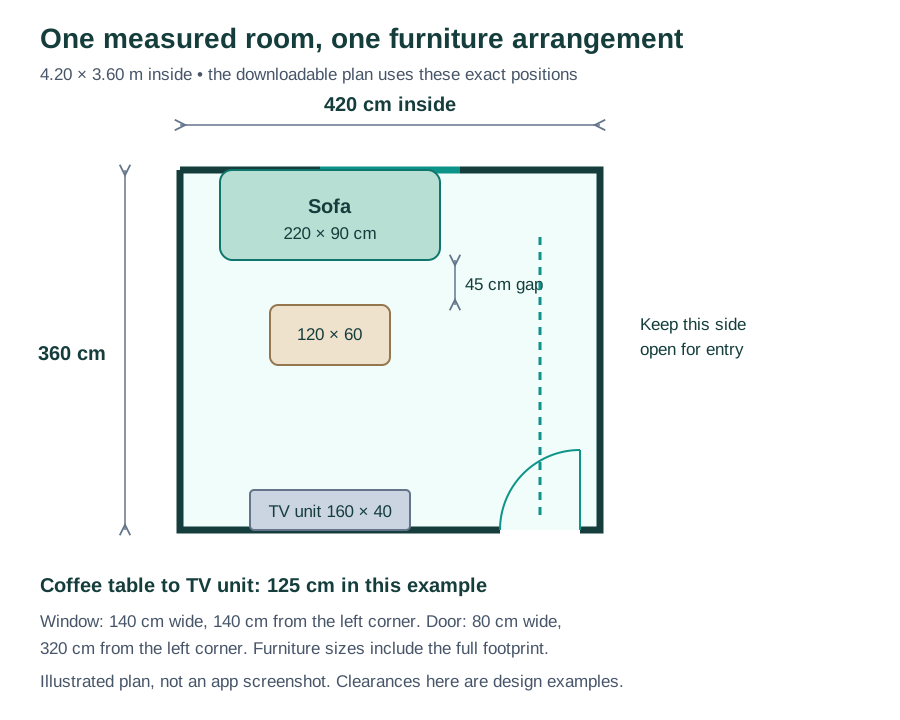
| Room interior | 420 × 360 cm | Finished inside wall faces; floor area 15.12 m². |
| Window on the top wall | 140 cm wide | Starts 140 cm from the left inside corner. |
| Door on the bottom wall | 80 cm opening | Starts 320 cm from the left inside corner; 20 cm remains at the right. |
| Sofa | 220 × 90 cm | Full footprint, starting 40 cm from the left wall. |
| Coffee table | 120 × 60 cm | Its near edge sits 45 cm in front of the sofa. |
| TV unit | 160 × 40 cm | Against the bottom wall, clear of the entrance. |
This is a deliberately simple example, without radiators or a chimney breast. Add the restrictions from your own room before copying the arrangement. The 5 cm wall thickness in the downloadable drawing is a drawing setting, not a claim about the construction of your walls.
2. Draw the outline and set the inside room size
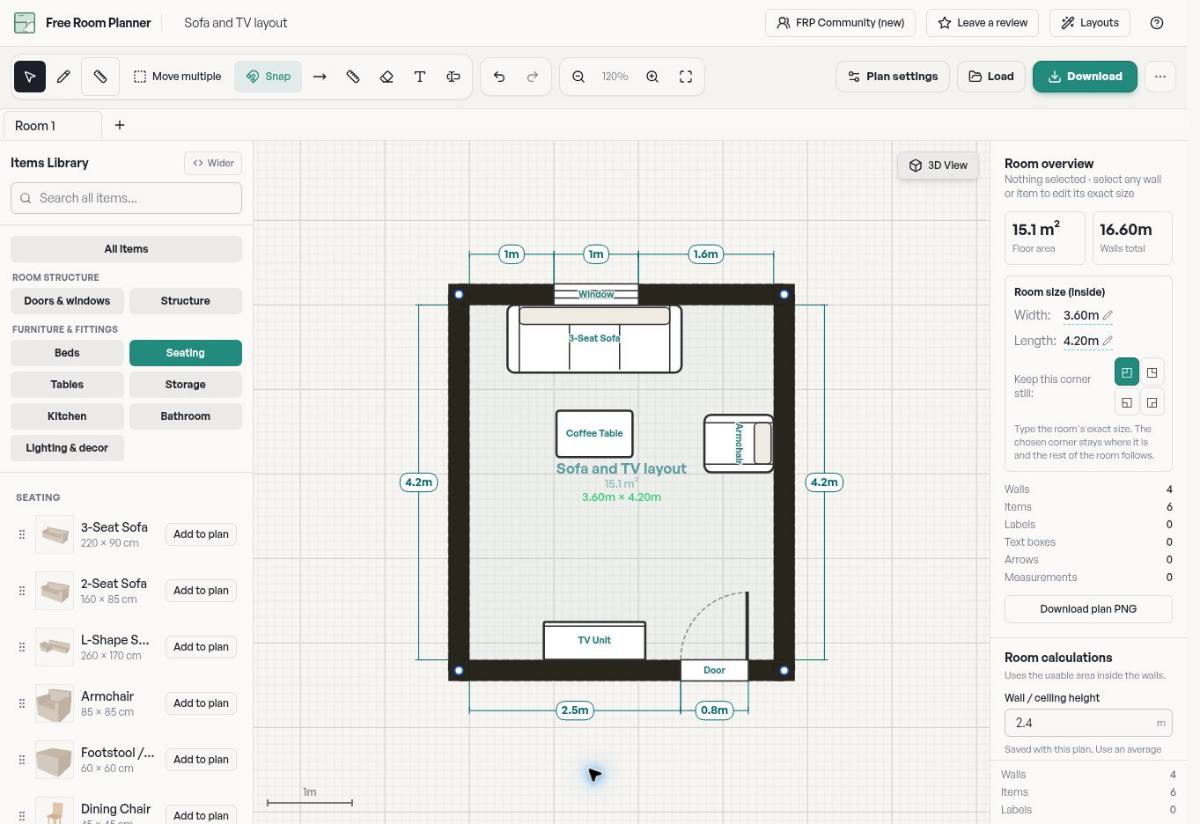
Open the room planner and start a room. For a rectangle, an empty rectangular room is a useful starting point. If you start from a blank canvas, choose Draw Walls, place each corner and close the outline by joining the last wall to the first corner.
Switch to Select / Pan to inspect the result. On a desktop, use Room overview in the properties panel; on a smaller screen, open Properties. For a closed rectangular room, its Room size controls let you enter the width and length.
- Check the units in plan settings. For this example, use centimetres.
- Use inside measurements, because the worksheet measured the finished inside faces.
- With no wall or furniture selected, enter 420 for room width and 360 for room length. Commit each value with Enter or by leaving the field.
- Check the result against the measurements shown on the plan. The inside floor area is 4.20 × 3.60 = 15.12 m²; the overview may round it for display.
The corner selected under Keep this corner still controls which corner stays in place while the rectangle resizes. Changing a room dimension moves its other sides, so set the shell before carefully positioning furniture.
For an irregular room, draw each measured wall segment instead of using rectangular width and length controls. Do not average genuinely different wall lengths to force a square shape. Use the L-shaped measuring example to organise those readings.
3. Position the doors, windows and fixed features
Find doors and windows in the item catalogue, add them to the plan and select each one to edit its size. Place the opening on the correct wall and compare its distance from the corner with your notes. A width alone does not locate a window.
For the example's top wall, the sequence is 140 cm of wall + 140 cm window + 140 cm of wall. The bottom wall is 320 cm of wall + 80 cm door + 20 cm of wall. Both add up to 420 cm.
Check the door's hinge side and swing arc, rotating or mirroring the item as needed. Here it opens into the room at the bottom right, leaving the TV unit to its left. Its open leaf and handle need space as well as its opening width.
Then add radiators, boxed-in pipes and built-in cupboards at their measured footprints. Use a text box for notes such as a socket location or window sill height when a floor-plan item alone does not convey the restriction. Keep access to service points in view throughout the layout exercise.
4. Add furniture at its complete size
Start with the largest piece. Select an item from the catalogue, then edit its dimensions in the properties panel. A generic sofa is a useful shape, but it only represents your sofa once its width and depth match your product, including arms and other projections.
Our sofa is 220 cm wide and 90 cm deep. Its back follows the top wall, beginning 40 cm from the left inside corner. The 120 × 60 cm coffee table is centred in front of it, with a 45 cm gap from the sofa's front to the table's near edge.
The TV unit is 160 × 40 cm on the opposite wall. The distance from the coffee table's far edge to the TV unit is 125 cm: 360 − 90 − 45 − 60 − 40. The open side of the furniture group provides a route from the entrance.
Those gaps describe this example; they are not universal minimums or accessibility requirements. Check your furniture's opening space and the needs of the people using the room. If you swap in a deeper sofa or larger table, calculate the remaining gaps again.
For another arrangement, move the sofa and table as a group of ideas: ask whether the entrance route improves and whether the window, sockets and television still work. Keep one saved version before making a substantial change so you can compare the alternatives.
5. Check the whole layout before calling it finished
- Room size: inside dimensions still match the measured room; no wall was dragged accidentally.
- Door swings: the entrance and any cupboard doors open without hitting furniture. Include handles and projecting drawers.
- Walking route: trace the route from the entrance to each seat. Check the narrowest point rather than an average gap.
- Window and heating: consider the actual sill height, window opening, radiator projection and ventilation or service instructions.
- Vertical fit: check tall furniture against ceiling height and beams; the footprint is only part of the fit.
- Delivery: measure doorways, stairs and turns on the way into the room. A fitting footprint does not guarantee a sofa will get through the hall.
Use the tape-measure tool to inspect a gap on the plan, and revisit the real room with your tape when the fit is close. The 3D view can help you understand the arrangement, but a perspective view is not a substitute for the measured 2D checks.
For kitchens or bathrooms, also check appliance and fixture access with the relevant manufacturer's dimensions. A planning drawing helps explain your idea; final installation details still need site checks.
6. Download the plan and check that it reopens
In the current editor, Download saves an editable PNG to your device. Keep the original file: it contains plan data so Load can reopen it for editing. A screenshot or an image resaved by another service may not retain that data.
- Choose Download and keep the original file in a folder you can find again.
- Use a meaningful filename, such as “living-room-option-a.png”, to distinguish alternatives.
- Open Load and check that the saved original reopens with its walls and furniture.
- Send the PNG as an attachment for someone to view. Use your original editable copy when you want to keep working.
Your work also autosaves in this browser, but a downloaded copy is useful if browser storage is cleared or you move to another device. These instructions cover the standard drawing and download workflow; you do not need a shared cloud link to follow the example.
Download the editable example Open Free Room Planner
The example download is a JSON plan file, not a picture. Choose Load, select that file and edit the room or furniture. It uses the same import format as saved FRP plans. Save your current work first because loading a plan replaces the active document.
Reading the drawing
In this example, thick lines are walls, the coloured opening on the top wall is a window, and the curved arc shows the entrance door's swing. Furniture shapes represent their full footprints. Dashed route lines in the explanatory diagram are annotations, not walls and not extra objects in the download.
Symbols vary between tools and professional drawing sets, so use labels or a legend when sharing a plan. A floor plan for a furniture discussion does not need to pretend to be a construction drawing.
Common questions
Can I make the plan without an account?
You can use the standard Free Room Planner drawing workflow in your browser without creating an account. This example uses the standard furniture catalogue and an editable download.
Do I need to draw to a particular scale on screen?
The app uses your entered dimensions. Zoom changes how large the plan looks on screen, not the real dimensions it represents. For paper drawings or printed output, state and verify the print scale separately.
Can I use this to brief a builder?
Yes, as a clearly labelled sketch of your ideas and measured observations. Structural alterations, fitted manufacturing and installation decisions require the appropriate professional checks and drawings.
Use the example for your own room
Start by replacing the room dimensions and opening positions, then resize the furniture to the pieces you own or plan to buy. The living-room planner has more starting arrangements; the furniture arrangement guide focuses on comparing layouts once the room shell is correct.